Defender Platform

Everything you need to build and run enterprise software

The Studio plans and builds your software with AI agents. rx1 runs it in production. Your people approve every step, and you own all of it.

Defender Studio

Your AI delivery team, in one app

AI agents take a project from the first interview to a running system. Your people approve every step, and every step leaves a document behind.

Requirements

Requirements your client actually signs

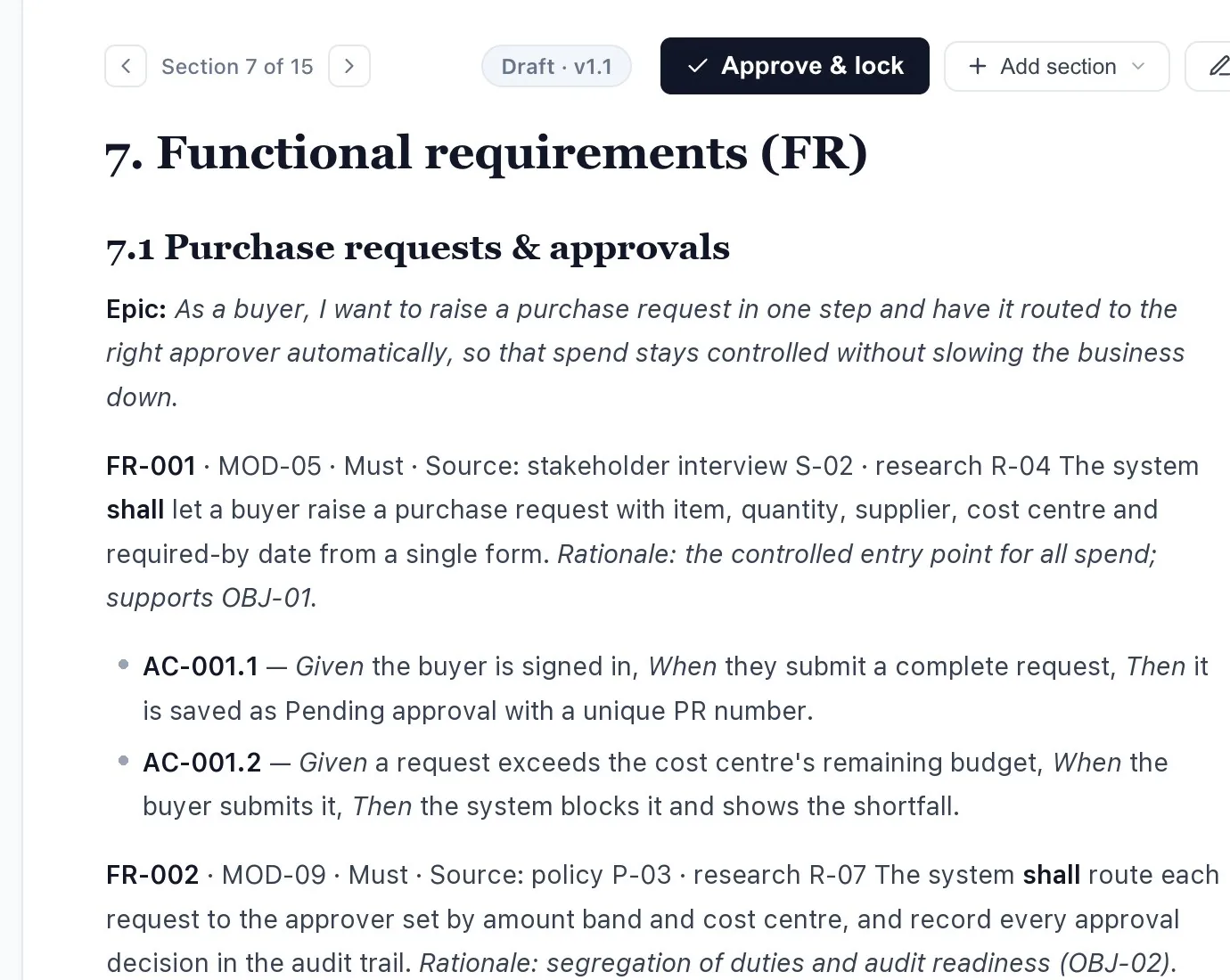
An AI business analyst interviews your stakeholders, researches the domain and writes the full requirements: modules, testable requirements and acceptance criteria, each with its source.

  • A separate verifier checks the document and gives a clear pass or fail
  • Your client reviews it and clicks Approve & lock
  • After that, every change is a change request with an impact check before anyone decides
A requirements document in the Studio, with an Approve and lock button
Architecture

Architecture, designed and decided

An AI architect turns the signed requirements into a solution design: how the system is split, how it connects to the systems you already run, and why each choice was made.

  • Diagrams are drawn from the design itself, so they never go stale
  • A decision record for every choice that matters
  • Technology research on the options, before anything is decided
  • A verifier checks the design, and your IT team approves it
Screens

See every screen before any code

An AI designer researches how the best products solve the same problem, maps your users' journeys and lays out every screen as a clean wireframe your users can review.

  • Design research and user journeys first, screens second
  • Every screen traces back to a requirement
  • Changes are cheap here, so this is where your users say "not quite"
Build

A live map of everything being built

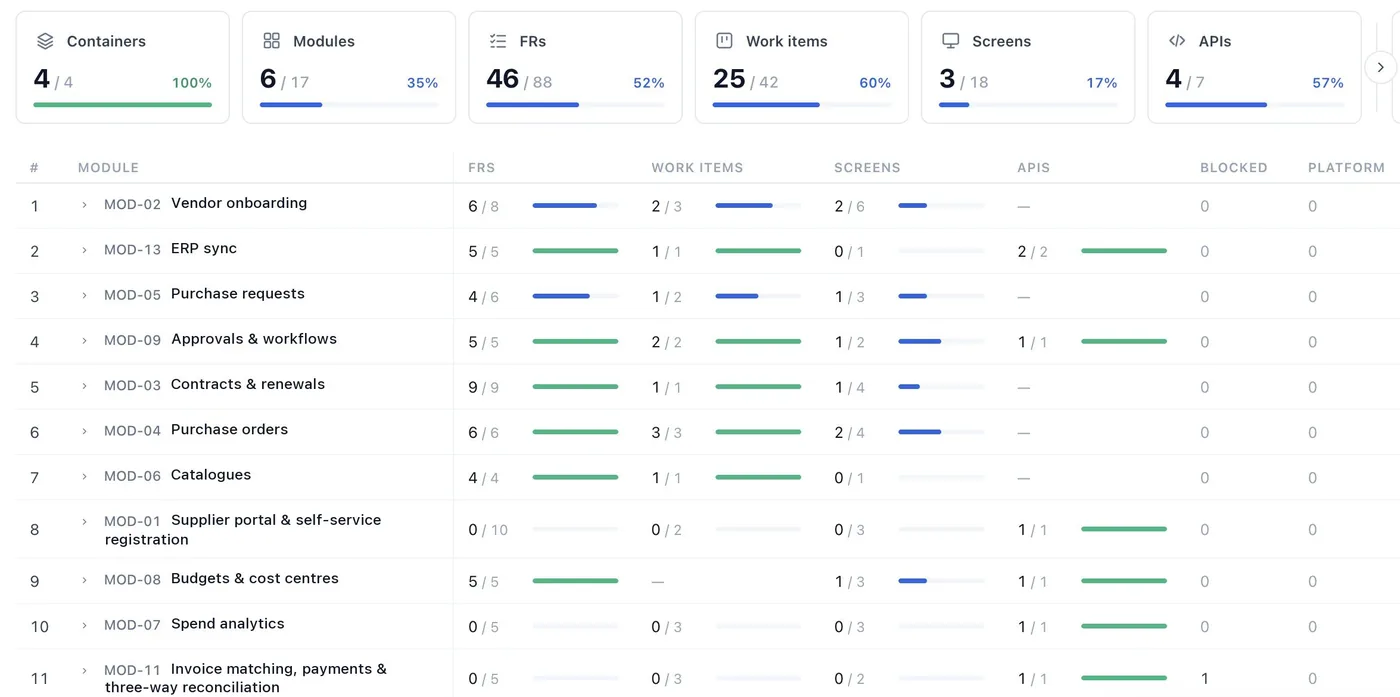
The build map shows every module of the design and how much of it is done: requirements, work items, screens and APIs, updated as work lands.

  • Work is planned as small, complete slices of a feature
  • Each slice is planned, built, checked and reviewed
  • Blockers show up on the map, not in a status meeting
The build map, showing each module's progress
Sprints and autopilot

Sprints that run themselves, with you in charge

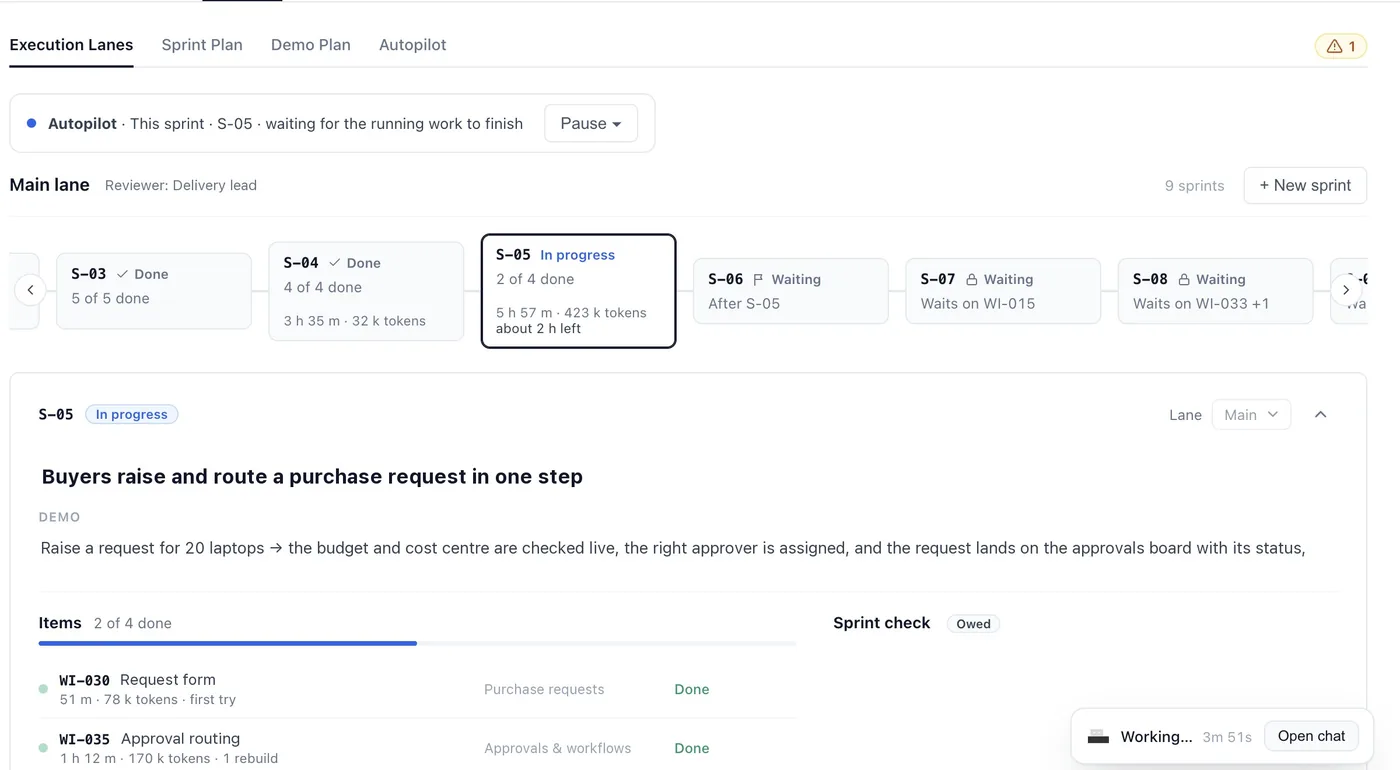
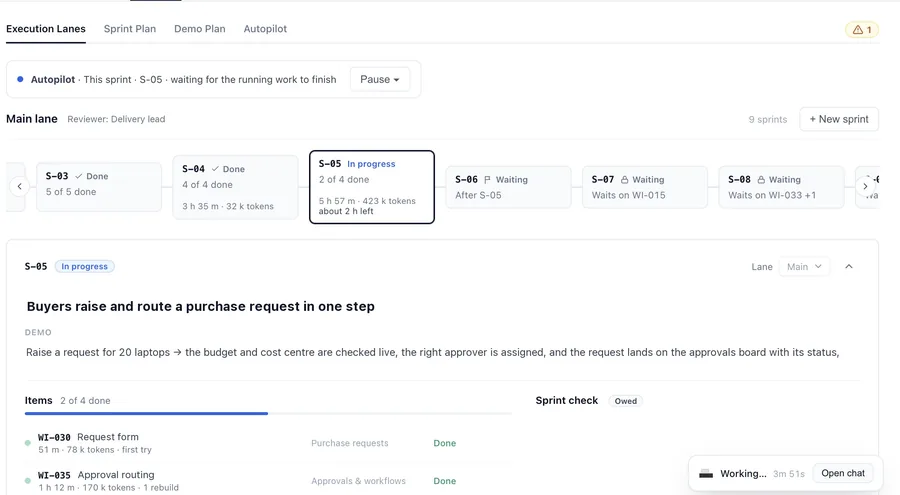
Sprints run in lanes, one per reviewer. Autopilot keeps the work moving day and night and stops at every point where a person needs to decide.

  • A "Your turn" queue for every approval: start, accept or send back
  • Spending caps, working hours, pause and stop
  • Several builds at once, each on its own branch and copy of the project
Sprint lanes with autopilot running
Quality

Built by AI. Checked by a different AI. Approved by a person.

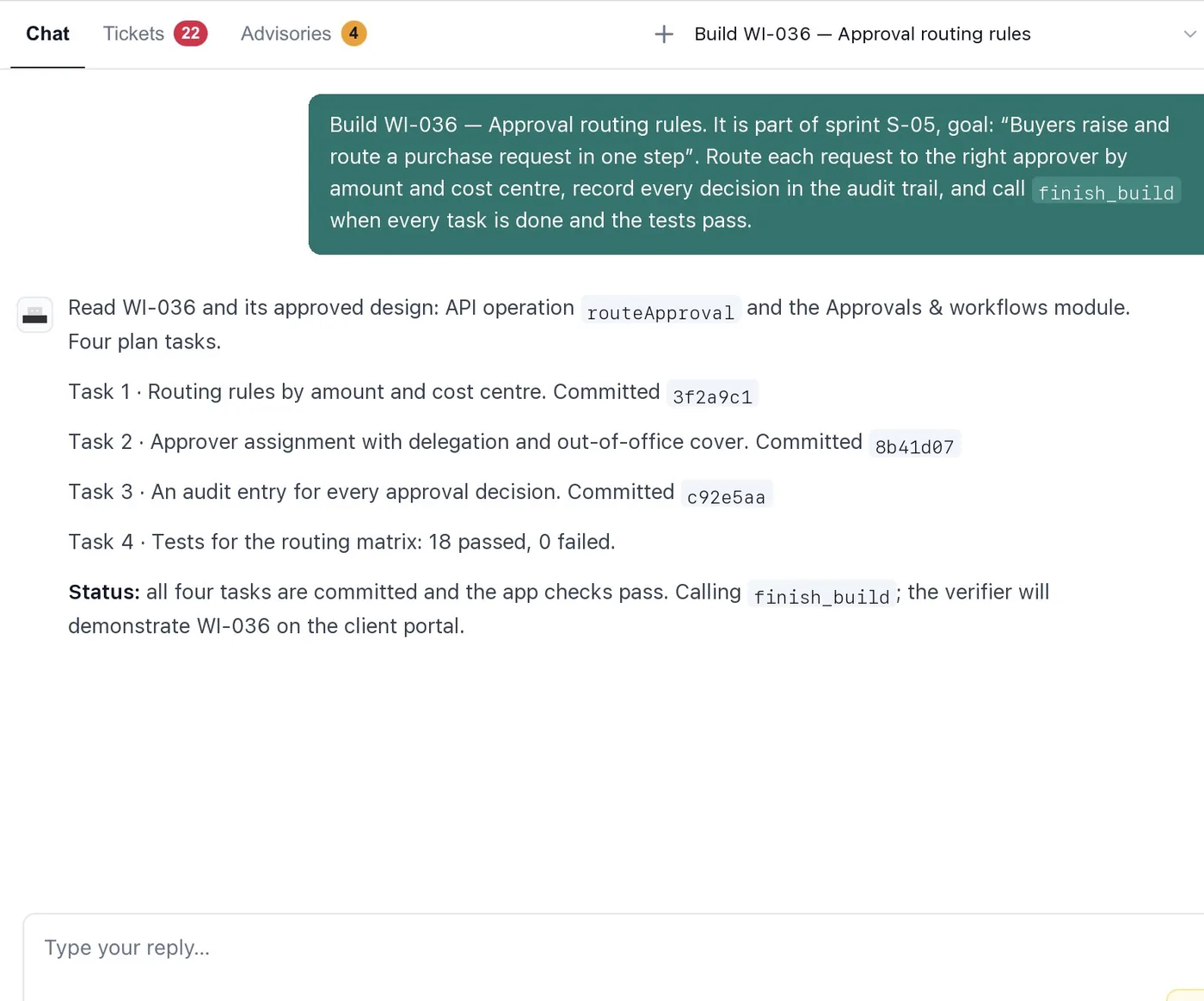
A builder agent writes the code and its tests. A separate evaluator agent checks the result, and it can only pass work by showing the evidence.

  • Three check levels: light, standard and full
  • The level goes up automatically when a change is bigger than planned
  • A person approves every verdict before work moves on
A builder agent reporting committed tasks and passing tests
Code and data

Every line of code, readable and yours

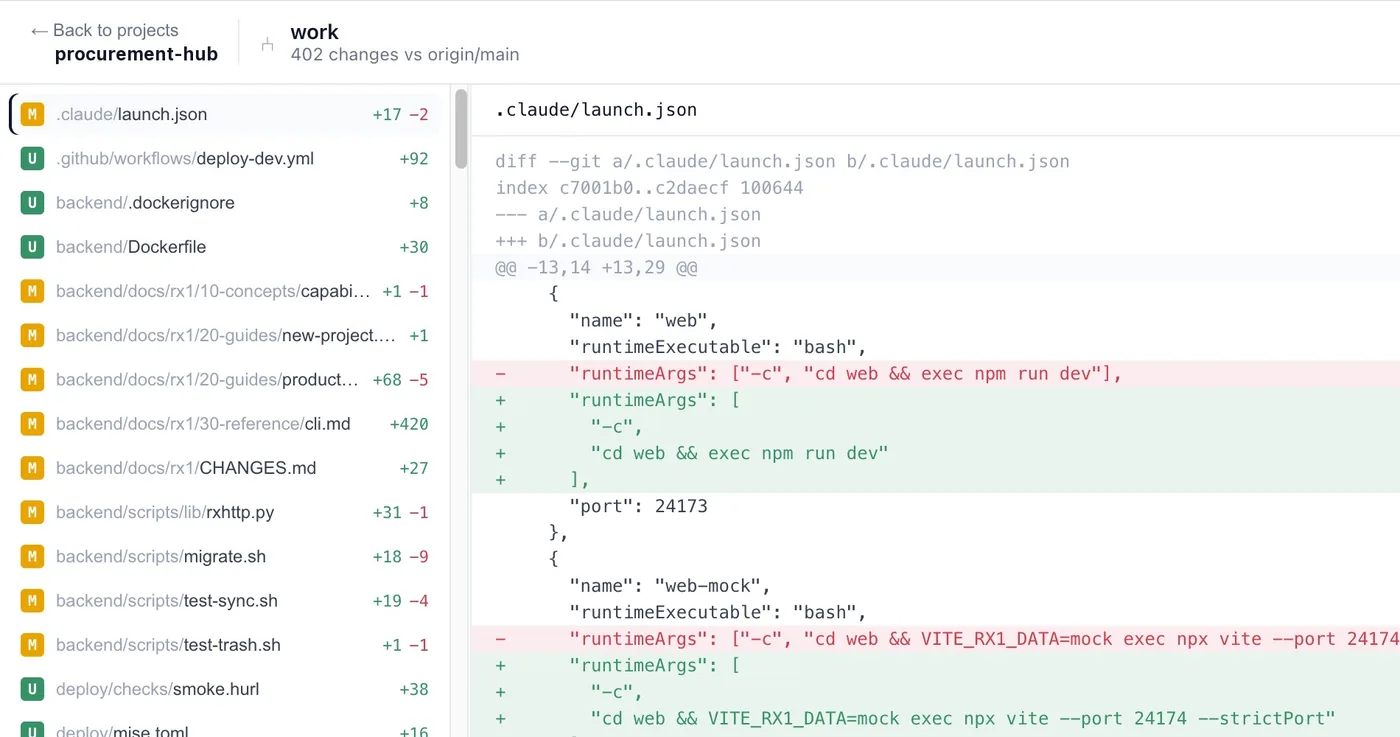
The code lives in your own repository. The Studio explains it in plain English, and shows every change before it's merged.

  • A codebase explorer with plain-English summaries and "ask the code"
  • Data, API services, configuration, integrations and screens, each in its own view
  • Every change reviewed as a diff, with a full history
Source control showing changed files and a diff
Deploy

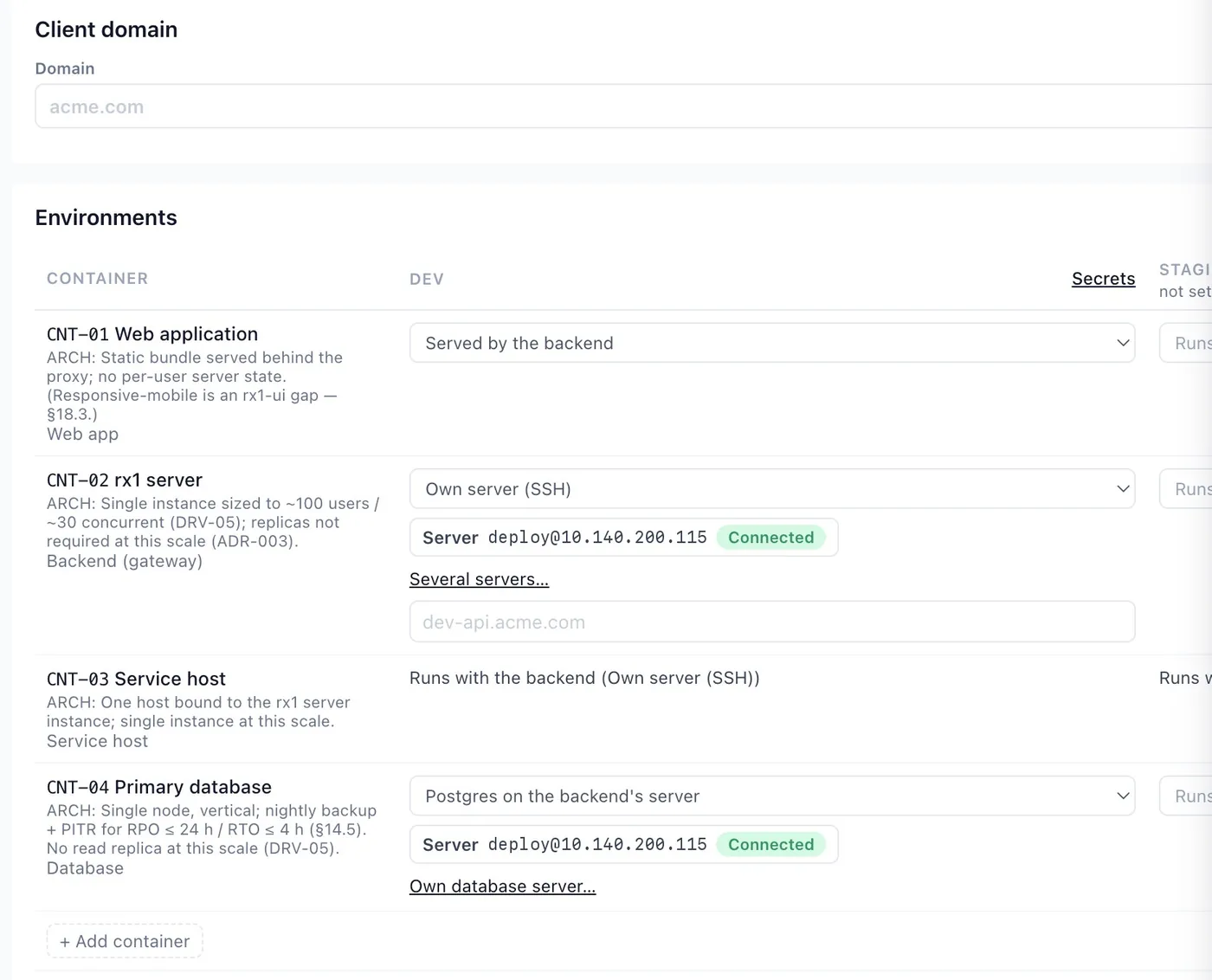
Deploy to your own cloud

Deployment agents prepare your servers, write the deploy files and ship each release, with the evidence your client signs.

  • Your own servers, Google Cloud Run or AWS ECS; Postgres, Cloud SQL or RDS
  • Several servers behind a load balancer, with rolling deploys
  • Releases, backups, restore drills and health checks in one place
  • A handover with the runbook and sign-off at the end
Deployment targets for each part of the app, with connected servers

One Lead agent for everything

Ask for any change in plain words. The Lead plans it, hands each part to the right agent and checks the result.

Keeps working when you close your laptop

Projects run on our servers, so agents, builds and autopilot carry on overnight.

A live copy for your client

Every project gets a secure web address with its latest finished sprint, so the client sees progress for themselves.

Everyone's name on their work

Owners, members and viewers, with a name on every decision, chat and commit.

rx1 Runtime

The runtime your apps run on

Every app the Studio builds runs on rx1: one fast core, written in Rust, that already handles the hard parts of enterprise software. Your team writes only the business logic.

27data plugins
163UI components
32screen templates
3languages for business logic
6AI model providers
4directory syncs
rx1-apigateway

API gateway

Every request to your app passes through the gateway first. It checks who is calling and what they're allowed to do, so your business logic never has to.

  • Encryption, cross-site rules and rate limits on every call
  • Sign-in tokens and permission policies checked on every request
  • Requests checked against your API description, with API docs generated
  • Incoming webhooks, with ready presets for GitHub, Stripe, Slack, Google and Microsoft
  • Scheduled jobs that run exactly once, even across several servers
  • Live updates to the browser, and signed outgoing webhooks with retries
Your team doesn't buildan API layerauth middlewarea job schedulerwebhook plumbing

folder services

Services

Business logic lives in plain service folders: one contract file, and one small handler per action, in the language your team already knows.

  • Handlers in Node, Java or Python
  • The contract comes first, so the API can be published before it's built
  • An action that isn't built yet answers clearly, instead of failing
  • Long-running work runs in the background, with its own record
Your team doesn't buildserver boilerplateroutingrequest parsing

rx1-rql · rx1-dbs

Data

One query language for all of your data, with the rules enterprises need switched on as plugins instead of written by hand.

  • Filters, related records, totals, paging, nested writes and batch transactions
  • Safe concurrent edits and safe retries
  • 27 plugins, including multi-tenancy, row-level security, field encryption and personal-data masking
  • Audit and full change history on any record
  • Tenants in one schema, a schema each or a database each
  • Postgres, with read replicas and caching
Your team doesn't builda data access layertenant isolationaudit historyfield encryption

rx1-iam

Identity

A complete sign-in and permissions service, built in. Or plug in the identity provider your company already uses.

  • OAuth 2.1 and OpenID Connect
  • Passwords, one-time codes by email, SMS or WhatsApp, and authenticator apps
  • Fine-grained permission policies written as rules, not code
  • Hosted sign-in pages and an admin console, with admins per organization
  • User provisioning with SCIM, and versioned terms and consent
  • Or accept sign-in from your company's own OpenID Connect provider
Your team doesn't builda login systemuser admina permissions engine

rx1-flowengine

Workflows

Approvals and multi-step processes, defined as versioned files and run by the engine, with deadlines and escalation included.

  • Tasks for people, with approvers picked from the org chart
  • Decision tables, timers, parallel branches and sub-processes
  • AI agent steps inside a workflow
  • Deadlines in working hours, with escalation
  • A task inbox for everyone, and approving by email, SMS, Slack or Teams
  • Test a workflow, and replay real cases against a changed version
Your team doesn't buildan approval engineescalation logica task inbox

rx1-org

Org chart

Your organization as data: people, positions and units, with history, so every approval goes to the right person.

  • Positions, people and units with dates, drafts and reorganizations
  • Find the approver: a manager, the reporting chain or a unit role
  • Sync from Microsoft Entra, Google Workspace, Okta or SCIM, or import a spreadsheet
  • An org chart and analytics, exported to PDF, PowerPoint, images or CSV
Your team doesn't buildan org directoryapprover routingdirectory sync

rx1-agent · rx1-mcp · rx1-knowledge

AI layer

Put an AI assistant inside your app that can only see and do what the signed-in person can, with approvals and undo for anything it changes.

  • An in-app assistant that streams its answers
  • Models from Anthropic, OpenAI, Azure, Gemini, Bedrock or Vertex
  • Each customer can bring their own AI key
  • Approvals before an agent acts, and undo for what it did
  • Search by words, close spellings and meaning, all in Postgres
  • Knowledge from your documents, including SharePoint and OneDrive
  • An endpoint so outside AI agents can work with the app, safely
  • A log of every agent action, budgets and quality tests
Your team doesn't buildAI plumbingguardrailssearch

rx1-connect · notify

Integrations

Connect the systems you already run, and send business messages wherever your people are.

  • Connectors made from an API description, with retries and a circuit breaker
  • Connected accounts with OAuth
  • Ready-made pieces from Activepieces and Apache Camel
  • Business messages by email, SMS, Slack and Teams
Your team doesn't buildAPI clientsretry logica messaging service

rx1-watcher

Watcher

See what every part of the app is doing, and prove what happened when your auditor asks.

  • Logs, traces and metrics, with Prometheus and OpenTelemetry export
  • A tamper-evident audit log
  • A browser portal to explore it all
  • An AI endpoint over the records, to help investigate issues
Your team doesn't buildlogging setuptracingan audit trail

rx1-ui

UI kit

Screens are described as structured files and turned into a modern React app, so every screen looks consistent and enterprise-ready.

  • 163 components and 32 screen templates
  • Built on React, shadcn, Radix and Tailwind
  • Account, security, admin and public pages in every app from day one
  • Versions and release notes shown inside the app
Your team doesn't builda design systemaccount pagesadmin screens

rx1

Command line

One command-line tool covers the whole life of an app, from the first project to production health checks.

  • Create, run and check a project: rx1 new, rx1 dev, rx1 doctor
  • Serve in production and build images: rx1 serve, rx1 image build
  • Pinned versions per project, and safe upgrades
  • Database, identity, workflow and AI tools in one place
Your team doesn't buildproject scaffoldingdev toolingrelease scripts
Get started with Defender

Bring one module you'd like to build. We'll write the full requirements for it, free, and show you the whole platform on it.

For enterprises

Build the modules your ERP can'tRegister

For consulting firms

Deliver client projects in weeksBecome a partner

Questions

Who owns the code?

You do. All of the source code, documents and designs live in your own repository, and stay yours.

Where does the finished app run?

In your own cloud or data center: your own servers, Google Cloud Run or AWS ECS, with Postgres, Cloud SQL or RDS for the database.

Which languages can our developers use?

Business logic is written in Node, Java or Python. Screens use React. The rx1 core itself is written in Rust, so your team never has to touch it.

Can we use our existing sign-in and directory?

Yes. rx1 can accept sign-in from your company's own OpenID Connect provider, and sync people from Microsoft Entra, Google Workspace, Okta or SCIM.

Is a person always in control?

Yes. Agents do the work, but requirements, designs, screens, test verdicts and releases all wait for a person to approve them.